
This page describes the transaction of the retrieval of the FHIR® resources.
In the communication pattern notified pull these resources are referenced in the input field of the Notification or Workflow Task.
These input fields contain valueReference in the input slice: read-available-resource.
Scope
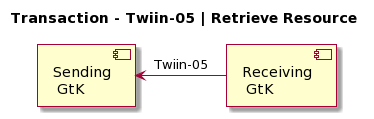
This transaction supports the request of resources by the Requesting System to the Resource Server.
Use Case Roles
Actor: Requesting GtK
Role: Sends a request for a specific resource on behalf of a retrieving user.
In the communication pattern notified pull, this is the Receiving GtK.
Actor: Responding GtK
Role: Processes the request and responds with the requested resource.
Note: In the communication pattern notified pull, this is the Sending GtK.
Referenced Standards
-
HL7® FHIR® standard STU3 https://hl7.org/fhir/stu3
Messages
Request message
The requesting GtK wants to obtain the resources that were referenced in the Task. These resources are retrieved using a FHIR® read interaction, i.e. executing an HTTP GET request to the resource servers FHIR® endpoint. If there is a relative path, the input valueReference must be appended to the FHIR® base-url.
GET [base]/<ResourceType>/<id>
The requesting GtK may provide the HTTP Accept header. Valid values for this header are application/fhir+json or application/fhir+xml. If none is set, the resource server will use its default.
Response message
The responding GtK returns the resource that is requested.
The payload of this message is the requested FHIR® resource. This message is returned to the requesting GtK.
The media type of the HTTP body must be either application/fhir+json or application/fhir+xml, based on the Accept header or default response content type.
When an error occurs an OperationOutcome resource must be returned with more details on the reason.
The HTTP response must be accompanied with the correct HTTP status code, e.g.:
-
200OK - The search was processed and a valid response was returned -
401Not Authorized - Authorization is required for the interaction that was attempted -
404Not Found - The resource could not be found -
410Gone - The resource was deleted
The requesting GtK processes the response according to application defined rules.